Quick answer: a DIY relay on a small VPS costs a few euros a month for the server. Managed IRL services start at $94 to $129 a month. What the money buys is bonding across several connections, a finished cloud OBS with overlays and alerts, and someone to call when it breaks mid-stream. If you stream on one good mobile network and can follow terminal commands, start with DIY. If your income depends on the stream staying up in bad coverage, the managed services earn their price.
Prices below were checked on each provider's own website on 28 September 2026. They change, so check again before you buy.
The IRL Streaming Cost Problem
IRL streaming means sending video over mobile networks, which drop out, change speed and hand over between cells while you walk. There are two ways to deal with that:
- Managed services: pay a monthly fee for someone else's cloud OBS, ingest servers and support
- DIY: rent a small server, run your own relay, and fix it yourself
The Major Players
Psynaps
Psynaps sells cloud OBS servers for IRL streaming (their site is superstreamsystem.com). Their plans:
| Plan | Price | What they list |
|---|---|---|
| Entry Level SRT/RTMP Ingest | $94/mo | Personal ingest with software for automating OBS at home; SRT, RTMP, HEVC |
| Standard IRL Server | $125/mo | Cloud OBS server, up to 1080p 30fps, overlays and alerts, SRT and HEVC |
| Gunrun IRL Server | $185/mo | Cloud OBS with an Nvidia RTX GPU, up to 1080p 60fps |
| 4K GPU Server | $269/mo | Dedicated Nvidia RTX GPU, 1080p60 up to 4K+, SRT, HEVC and AV1 |
They also mention network bonding, support for SRT and SRTLA devices, their own "Anti-RIP" technology against drops, and full-time support.
IRLToolkit
IRLToolkit runs cloud OBS with a web dashboard:
| Plan | Price | What they list |
|---|---|---|
| Standard | $129/month | Up to 1080p60, 7500 Kbps output, one RTMP/SRT/SRTLA ingest, multistream to 2 destinations, standard support |
| Advanced | $179/month | Uncapped resolution and bitrate, multiple ingests on request, multistream to 5 destinations, priority support |
| Custom | Quote | Custom workflows and dedicated support |
Both plans include a Twitch chat bot for alerts and commands.
LiveU Solo PRO
LiveU Solo PRO is a hardware bonding encoder, a different category from the two above. LiveU's product page lists two Solo PRO Connect kits that add modems to the encoder: Duo with two connections at $450, and Quattro with four connections at $995, which also includes a belt pack and Y-cables. The encoder itself is bought separately, and the data plans are activated and priced in LiveU's Solo Portal, so neither price is on that page.
DIY on a VPS
What you build:
- An NGINX-RTMP or SRT relay server
- Your own encoder settings on the phone
- Bonding only if you add the hardware and software for it yourself
What it costs:
| Component | Cost |
|---|---|
| VPS for a relay (no re-encoding) | Space-Node VPS-S: €5.50/month for 4 GB and 2 vCores |
| Domain (optional) | A few euros a year |
| Your time | An evening to set up, plus whatever breaks later |
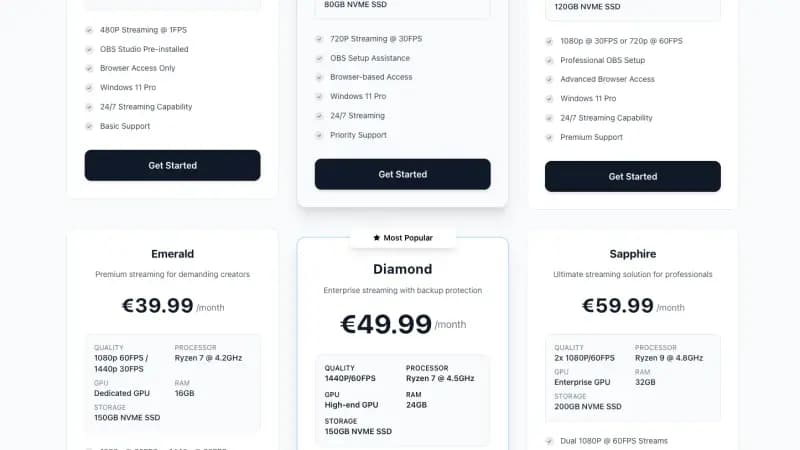
A relay that only passes the stream through with -c copy needs very little CPU, so the smallest plan is enough. If you want overlays, alerts and scene switching in the cloud, you need a machine that can run OBS and encode, which is a bigger box. Space-Node's Windows streaming VPS comes with OBS preinstalled. For IRL video you need Gold (€19.99, 720p30) or Platinum (€29.99, 1080p30 or 720p60); the €9.99 Stone plan is listed at 480p and 1 FPS.
Note: Space-Node's VPS plans are out of stock until about the end of October. Any small Linux VPS works for the relay in the meantime.
Feature Comparison
Only what the providers list themselves. "Not listed" means we did not find it on their page, not that it is missing.
| Feature | DIY VPS relay | Psynaps | IRLToolkit |
|---|---|---|---|
| Monthly price | Server from €5.50 | $94 to $269 | $129 to $179 |
| SRT ingest | Yes (you set it up) | Yes | Yes |
| SRTLA (bonded) ingest | Only if you set it up | Listed | Listed |
| Cloud OBS with overlays | No, unless you run OBS yourself | Yes | Yes |
| Multistream | Yes (nginx push lines) | Simulcasting listed; the 4K GPU Server says "multistream ready" | 2 or 5 destinations |
| Support | You, plus community forums | Full-time support | Standard or priority |
Who Should Use What?
DIY suits you if you can troubleshoot over SSH, stream on one mobile network with decent coverage, and want to keep monthly costs down.
A managed service suits you if coverage on your routes is patchy and you need bonding, if the stream is your income and an hour offline costs real money, or if you do not want to touch a terminal.
A hardware bonding encoder like LiveU suits broadcasters who need several networks at once and a device built for it, and who have the budget for hardware plus data plans.
Building the Budget Setup
Hardware
| Item | Budget | Mid-range | Premium |
|---|---|---|---|
| Phone or encoder | Used phone with Larix Broadcaster | GoPro with Media Mod | Teradek VidiU |
| Modem or router | Phone hotspot | GL.iNet travel router | Peplink cellular router |
| Battery | 20,000 mAh power bank | 50,000 mAh power bank | Goal Zero power station |
| Audio | Phone mic | Rode Wireless GO II | Hollyland Lark M2 |
| Mount | Chest mount | Selfie stick | DJI Osmo Mobile gimbal |
Check current prices yourself; gear prices move too often to print here.
VPS Setup
# Any Ubuntu 22.04 VPS with 2 cores is enough for a relay
# SSH in and install NGINX with the RTMP module
apt update && apt upgrade -y
apt install nginx libnginx-mod-rtmp -y
NGINX Configuration
rtmp {
    server {
        listen 1935;
        chunk_size 4096;

        application live {
            live on;
            record off;

            # Push to Twitch
            push rtmp://live.twitch.tv/app/YOUR_TWITCH_KEY;

            # Kick: copy the stream URL from your Kick dashboard.
            # It is an RTMPS address, and the push directive only speaks plain RTMP,
            # so hand that one to ffmpeg instead:
            # exec_push ffmpeg -i rtmp://localhost/live/$name -c copy -f flv YOUR_KICK_RTMPS_URL/YOUR_KICK_KEY;
        }
    }
}
Mobile Encoder Setup (Larix Broadcaster)
- Install Larix Broadcaster (iOS and Android)
- Add a connection:
- URL:
rtmp://YOUR_VPS_IP/live - Stream name:
mobile
- URL:
- Configure:
- Video: 720p, 30fps (easier on battery and data)
- Bitrate: 2500 kbps to start
- Encoder: H.264, hardware
SRT Setup for Better Reliability
SRT copes with packet loss much better than RTMP. It retransmits lost packets within a latency window you choose, so short dropouts on mobile data often never reach the viewer. How much loss it can hide depends on that window and on your bitrate.
Install SRT on VPS
apt install srt-tools ffmpeg -y
Create SRT Relay Script
nano /home/user/srt-relay.sh
#!/bin/bash
# SRT to RTMP relay

srt-live-transmit \
    "srt://:9999?mode=listener" \
    file://con | \
    ffmpeg -i - \
    -c:v copy -c:a copy \
    -f flv rtmp://live.twitch.tv/app/YOUR_KEY
Make it executable with chmod +x /home/user/srt-relay.sh.
Run as Service
sudo tee /etc/systemd/system/srt-relay.service << 'EOF'
[Unit]
Description=SRT to RTMP Relay
After=network.target

[Service]
Type=simple
ExecStart=/home/user/srt-relay.sh
Restart=always

[Install]
WantedBy=multi-user.target
EOF

sudo systemctl enable srt-relay
sudo systemctl start srt-relay
Larix SRT Settings
- Protocol: SRT
- URL:
srt://YOUR_VPS_IP:9999 - Latency: 1000ms to start. Raise it if the picture still breaks up on your route, lower it if the delay bothers chat.
Test the whole chain on the route you actually stream, at the time of day you stream. Mobile coverage differs by street and by hour, and nobody else's test tells you how your route behaves.
When Premium Services Are Worth It
You Need Bonding
If one network is not reliable where you stream, you need to combine several connections. The options:
| Option | What it takes |
|---|---|
| DIY | Two phones or a multi-SIM router, plus SRTLA or a bonding router set up yourself |
| Managed cloud (Psynaps, IRLToolkit) | Their SRTLA-capable ingest plus a bonding app or device on your side |
| LiveU Solo PRO | The encoder plus a Connect kit and LiveU data plans |
DIY bonding is possible, but it is the part of IRL streaming where most people give up and pay.
You Stream for Income
If IRL streaming is your job, count what an hour offline costs you. With DIY you are the one troubleshooting while viewers leave. With a managed service someone else is looking at it too. $125 to $185 a month can be cheap insurance if a single bad evening costs more than that.
You Have No Technical Skills
If you cannot follow terminal commands, DIY will cost you more in frustration than it saves. Start with a managed service and learn the DIY side later if you want to.
Hybrid Approach
Run DIY for your everyday streams, and add a managed service in the months you have events where a drop would really hurt. Psynaps and IRLToolkit both list monthly prices, so check their cancellation terms before you plan around that.
For multistreaming alone you do not need an IRL service at all: Restream has a free plan that sends to 2 channels at once, with Restream branding.
Building Redundancy on a Budget
Failover to a "be right back" loop
The simplest backup does not need a second encoder. Keep a short looping video on the VPS and send that to Twitch whenever the phone stream is missing, so the channel stays live instead of going offline.
nano /home/user/failover.sh
#!/bin/bash
PRIMARY_STREAM="rtmp://localhost/live/mobile"
BACKUP_FILE="/home/user/brb.mp4"
OUTPUT="rtmp://live.twitch.tv/app/YOUR_KEY"

while true; do
    if timeout 5 ffprobe -v quiet -i "$PRIMARY_STREAM"; then
        # Phone is live: pass it through until it drops
        # -rw_timeout (microseconds) makes ffmpeg exit when no data arrives for 5 seconds
        ffmpeg -rw_timeout 5000000 -i "$PRIMARY_STREAM" -c copy -f flv "$OUTPUT"
    else
        # Phone is gone: play the loop for 30 seconds, then check again
        timeout 30 ffmpeg -re -stream_loop -1 -i "$BACKUP_FILE" -c copy -f flv "$OUTPUT"
    fi
    sleep 1
done
Remove the push lines from the NGINX config when you use this script, otherwise NGINX and the script both push to Twitch. Every switch is a short reconnect on Twitch's side, and the loop file should use the same resolution and codecs as your phone stream. Run the script as a systemd service, the same way as the SRT relay.
Cost of Redundancy
| Item | Cost |
|---|---|
| Primary VPS | Space-Node VPS-S at €5.50/month, or any small VPS |
| Second SIM | Whatever your carrier charges for a data SIM |
| Backup VPS at another provider (optional) | Usually a few euros a month |
What You Lose with DIY
No Finished Dashboard
IRLToolkit lists a web dashboard, and both managed services give you a cloud OBS you can control remotely. The DIY workaround is an SSH app on your phone or a small status page you build yourself.
No Support Desk
When something breaks mid-stream, you fix it. IRL streaming communities on Discord help, but nobody is on call for you.
No Automatic Bonding
Managed services built around SRTLA can spread the stream over several connections. On DIY you either set that up yourself or live with one network.
Cost Over Time
At list prices, the first year looks like this (your mobile data comes on top in every case):
| Setup | Monthly | First year |
|---|---|---|
| DIY relay on Space-Node VPS-S | €5.50 | €66 |
| Psynaps Standard IRL Server | $125 | $1,500 |
| IRLToolkit Standard | $129 | $1,548 |
| LiveU Solo PRO | Data plan (priced in the Solo Portal) | Encoder plus $450 or $995 Connect kit, plus data |
The gap is large. What closes it is your time, and the bonding and support that DIY does not include.
Upgrading a DIY Setup Over Time
Start small and add gear in the order that fixes your biggest problem:
- Phone, Larix, a chest mount and a relay VPS. That is enough to go live.
- A wireless mic. Viewers forgive a soft picture sooner than bad audio.
- A second SIM and a travel router, so you can switch networks when one fails.
- A better camera and a bigger battery once you know your routes and stream length.
- Bonding, or a managed service, once dropouts are the thing costing you viewers.
Frequently Asked Questions
Is DIY as reliable as Psynaps?
Nobody can give you an honest percentage for your route. A single-network SRT relay handles short dropouts well. It cannot help when the one network you are on has no signal, and that is exactly where bonded services earn their price.
Can I switch from DIY to a managed service later?
Yes. Nothing you build is wasted: you learn how SRT, bitrate and ingest work, which makes a managed service easier to troubleshoot as well.
What if I have no cell coverage?
Neither DIY nor a managed service can fix that. You need a different connection (satellite internet, for example), pre-recorded segments, or a different location.
Do sponsors care which setup I use?
Sponsors look at viewers and engagement, not your backend. Viewers cannot see whether the relay is yours or rented.
Can I use cloud OBS instead of streaming straight from the phone?
Yes. Run OBS on a VPS, send the phone video to it over RTMP or SRT, and let OBS add overlays and alerts. You need a machine that can encode for that, not just a relay. Space-Node's streaming VPS is a Windows machine with OBS preinstalled.
Decision Framework
1. How technical are you?
- Beginner: start with a managed service, learn DIY later
- Intermediate: start DIY and keep a managed service in mind for events
- Advanced: DIY, including bonding if you need it
2. What's your budget?
- Under $50 a month: DIY is the only option
- Around $125 to $185 a month: cloud OBS at 1080p (Psynaps Standard at $125 is 1080p30; IRLToolkit Standard at $129 and Psynaps Gunrun at $185 are 1080p60)
- $179 and up: uncapped or 4K plans (IRLToolkit Advanced $179, Psynaps 4K GPU Server $269)
3. How much does downtime cost you?
- Hobby streaming: DIY, and accept the occasional drop
- Part-time income: DIY with SRT and a "be right back" failover
- Full-time income: consider a managed service
4. What's your coverage like?
- Good on one carrier: DIY works
- Patchy: you need bonding, managed or DIY
- None: nothing streams without a connection
Conclusion
| Factor | DIY | Managed |
|---|---|---|
| Cost | Server from €5.50/month | From $94/month |
| Bonding | Only if you build it | Included in the SRTLA-capable plans |
| Control | Complete | What the dashboard offers |
| Support | You | Included |
Start with DIY if you can handle a terminal. You keep most of the money, learn how the chain works, and can move to a managed service later if your income justifies it.
Ready to build a relay? Space-Node's VPS plans start at €5.50/month with full root access, a 1 Gbps port and servers in the Netherlands. They are out of stock until about the end of October. For cloud OBS with overlays, see the streaming VPS.
Related guides:
Legal Notice
Legal Notice & Disclaimer: This article constitutes an independent, factual comparative review and critical analysis for educational purposes only. Space-Node is not affiliated with, endorsed by, or sponsored by any hosting provider mentioned herein. All brand names, logos, and trademarks referenced are the registered intellectual property of their respective owners and are used solely for identification and factual reference.
Fair Use & Review Rights: This review is protected commentary, comparison, and criticism. It is based on publicly available information, official pages where available, published documentation, and general hosting engineering analysis. Where hands-on testing is not explicitly stated in the article, no private benchmark or internal infrastructure access is implied. This constitutes lawful comparative review and criticism protected under fair use doctrine.
Factual Accuracy: Specific plan claims are based on public information available at the time of writing. Specifications, pricing, and service features can change, so readers should verify current details on the provider's official website before purchasing. We make no false or defamatory statements; criticism is limited to documented facts, clearly labeled opinion, or general hosting guidance.
No Consumer Confusion: This article makes clear that Space-Node offers distinct, independently-developed hosting infrastructure. We explicitly differentiate our services, pricing, and technical specifications. No reader could reasonably be confused about service provider identity.
Right to Comparative Advertising: Space-Node reserves the right to publish factual comparative information about competing services. This is a recognized right in consumer protection law and advertising standards. Accurate comparative reviews cannot constitute trademark violation, defamation, or unfair competition.
Limitation of Liability: Space-Node makes no warranty regarding third-party services reviewed. Readers are responsible for verifying information independently before purchasing. Space-Node disclaims liability for third-party service changes, outages, or policy modifications.
Space-Node Services: For Space-Node's own managed hosting solutions, visit Minecraft hosting or VPS hosting.