
Most VPS checkouts give you a choice: pay every month, or pay for a year up front at a lower monthly rate. The yearly rate looks like an easy saving, until the project stops in month seven, the plan turns out too big, or the second year renews at a higher price. Here is how to work out the full cost, with our own billing terms as a dated example.
Quick answer: A yearly term only saves money if you keep the same server for at least 11 of the 12 months. At 10% off, a prepaid year costs what 10.8 monthly payments cost, so if you stop after 10 months, paying monthly would have been cheaper. Pay monthly while the project, the host or the plan size is new, and prepay once the server has run on the same plan for a few months. Before you prepay, check the renewal price, refunds for unused months, setup fees, how plan changes are billed, and VAT.
Three Ways Hosts Price a Longer Term
Hosts reward a longer commitment in different ways, and the model decides what you compare.
| Model | How you pay | Example, checked 30 October 2026 |
|---|---|---|
| Fixed percentage off | Each longer period costs the monthly price minus a set percentage and renews for the same period | Our terms below: 5% off 3 months, 10% off 6 or 12 months |
| First-term price | A low rate for a long first term, paid up front, then a higher renewal rate | Hostinger KVM 1: $6.49 a month for 24 months, renewing at $11.99 a month |
| Usage billing with a cap | Per hour or per second, never above a monthly cap, with no term to commit to | Hetzner Cloud: hourly with a monthly price cap. DigitalOcean bundled Droplets: per second, capped at 672 hours a month |
A fixed percentage is the easiest to compare: if prices stay the same, the second year costs what the first did.
A first-term price needs a longer view. On 30 October 2026, Hostinger's VPS page said of KVM 1: "Today you pay $155.76 for 24 months. Renews at $11.99/mo for the same term." The next 24 months then cost $287.76, so four years come to $443.52, an average of $9.24 a month instead of $6.49. The same page says all plans are paid upfront and that its prices are listed without VAT.
Usage billing has no term to lose, but the meter runs for as long as the server exists. Hetzner's billing FAQ says you pay for a server "regardless of whether it is turned on or not", with usage rounded up to whole hours. DigitalOcean keeps billing a powered-off Droplet on a bundled plan because the compute resources "stay reserved on the hypervisor". You stop paying by deleting the server, not by shutting it down.
Work Out the Break-Even Point
For a fixed discount, divide the term price by the monthly price. The answer is how many monthly payments the term is worth. If you would keep the server for fewer months than that, paying monthly is cheaper.
| Term | Discount | Worth in monthly payments |
|---|---|---|
| 3 months | 5% | 2.85 |
| 6 months | 10% | 5.4 |
| 12 months | 10% | 10.8 |
A year at 10% off costs 10.8 monthly payments. Stop after 10 months and monthly billing would have cost 10 payments, less than the year. Stop after 11 and it would have cost 11, more than the year. The discount is a cushion of 1.2 months: enough to stop one month early, not two.
For a first-term price, average every payment, renewals included, over the time you expect to stay, as in the Hostinger example. Both sums assume unused months are not refunded. Where they are, prepaying carries less risk, which is why refunds come first below.
What to Check Before You Prepay
The discount is the easy part. These terms decide the rest of the cost:
- Refunds and cancellation. Find out whether cancelling mid-term refunds the unused months or only stops the next renewal, and whether there is a money-back window. In the EU, a consumer who buys a service online can withdraw within 14 days after the day the contract was agreed, without giving a reason. If the service started at your request within those 14 days, you pay an amount "in proportion to what has been provided", under article 14(3) of the Consumer Rights Directive. After that, the host's terms decide.
- The renewal price. Look for a "renews at" line next to the term price, and average a first-term deal over your whole stay.
- Setup fees. Add any one-time fee to the term it is charged on, and compare the amount due today plus later renewals, not the headline monthly rate.
- Plan changes during the term. Check whether upgrades and downgrades are calculated pro rata, whether a downgrade pays out or leaves a credit, and whether that credit expires. A change can also cost you an old price: Hetzner's FAQ lists rescaling, up or down, among the actions that switch a server still billed at old prices to its current pricing.
- VAT and currency. Compare like with like: both prices with VAT if you are a consumer, both without if your business reclaims VAT, and both in one currency.
- Price changes. Read how much notice the host gives before a price rise, and whether you can leave before it applies.
- Extras billed separately. IPv4 addresses, backups and extra storage can be lines of their own. Hetzner, for example, bills Primary IPv4 addresses separately from its cloud servers, with Primary IPv6 free, and charges 20% of the server price for Backups (checked 30 October 2026). Add every extra to both sides of the comparison.
Check Your Usage Before You Commit
A long term fixes the plan size as well as the price. Before you prepay, look at what the server really uses. Run these at busy times on several days:
free -h
df -h /
free -h prints memory in readable units. Read the available column: an "Estimation of how much memory is available for starting new applications, without swapping." df -h / shows the size, used and available space of the filesystem that holds /. For the full method, see how much RAM your VPS needs, and for CPU, how to read steal time.
If the server runs close to its limits, upgrade first and prepay the bigger plan. If it uses a small part of its plan week after week, move to a smaller plan before you prepay: a downgrade in the middle of a prepaid term may only come back as credit, as in the example below.
Our Terms as a Dated Example
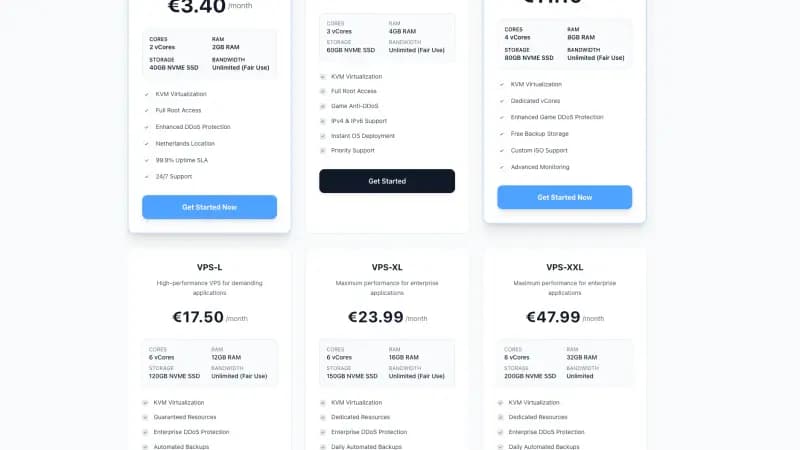
As of 30 October 2026, the Space-Node checkout offers every VPS plan with four billing periods: Monthly, Quarterly, Semi-annually and Annually. Prices include VAT. The last column shows what the 12-month term saves against twelve monthly payments.
Standard VPS (AMD EPYC 7452, DDR4)
| Plan | Monthly | 3 months | 6 months | 12 months | Year saves |
|---|---|---|---|---|---|
| VPS-S | €4.99 | €14.22 | €26.95 | €53.89 | €5.99 |
| VPS-M | €8.99 | €25.62 | €48.55 | €97.09 | €10.79 |
| VPS-L | €12.99 | €37.02 | €70.15 | €140.29 | €15.59 |
| VPS-XL | €16.99 | €48.42 | €91.75 | €183.49 | €20.39 |
| VPS-XXL | €31.99 | €91.17 | €172.75 | €345.49 | €38.39 |
| VPS-3XL | €39.99 | €113.97 | €215.95 | €431.89 | €47.99 |
| VPS-4XL | €47.99 | €136.77 | €259.15 | €518.29 | €57.59 |
Premium VPS (AMD Ryzen 9 9950X, DDR5)
| Plan | Monthly | 3 months | 6 months | 12 months | Year saves |
|---|---|---|---|---|---|
| VPS-XS | €4.20 | €11.97 | €22.68 | €45.36 | €5.04 |
| VPS-S | €8.40 | €23.94 | €45.36 | €90.72 | €10.08 |
| VPS-M | €16.80 | €47.88 | €90.72 | €181.44 | €20.16 |
| VPS-L | €25.20 | €71.82 | €136.08 | €272.16 | €30.24 |
| VPS-XL | €33.60 | €95.76 | €181.44 | €362.88 | €40.32 |
| VPS-XXL | €67.20 | €191.52 | €362.88 | €725.76 | €80.64 |
| VPS-3XL | €84.00 | €239.40 | €453.60 | €907.20 | €100.80 |
| VPS-4XL | €100.80 | €287.28 | €544.32 | €1,088.64 | €120.96 |
Two things stand out. The 6-month term gets the same 10% as the year, so two half-year payments cost the same as one yearly payment, or one cent more. And on every plan the year saves 1.2 times the monthly price. For a Standard VPS-S: keep it 10 months on monthly billing and you pay €49.90, less than the €53.89 year; keep it 11 and you pay €54.89.
Here is how the checks above come out, from the checkout, our VPS page and our terms and conditions of 29 October 2026, which apply to agreements made from that date:
- Setup fees: none, on any VPS plan or period. The amount due today is the period price.
- Renewal: each period renews automatically for the same period (articles 6.1 and 8.1). The checkout shows one price per period and no separate renewal price.
- Refunds: there is no free trial or money-back guarantee, and a paid period is not refunded once the VPS has been delivered, also if you cancel early (article 7.3). A consumer can still withdraw within 14 days and then pays only for the part of the period that has passed (7.5).
- Cancellation: in the client area, by ticket or by email from your account's address (8.1). You choose to stop at the end of the paid period, with the VPS running until then, or at once without a refund (8.2). Once a consumer's service has renewed at least once, it can be cancelled at any time with at most one month's notice, and prepaid time after that notice is refunded (8.3).
- Plan changes: you are free to upgrade or downgrade. The current period is calculated in proportion, and a resulting credit goes on your next invoice and expires if it is not used within 6 months (8.4).
- VAT: VAT is calculated for your billing country, and the order summary shows the subtotal without VAT, the VAT and the total due today. A business in another EU country with a valid VAT number can ask before ordering how VAT is handled (5.1).
- Price changes: at least one month's notice, and you may terminate before the new price takes effect (5.2). For business clients, prices may also rise once a year, on 1 January, by up to 4%, without a right to terminate (5.3).
- Extras: backups are not included in the plan price. You can arrange them through a support ticket or run your own off-site backup with restic. The order form offers extra NVMe storage as an add-on.
Which One Fits
- Monthly while something is still uncertain: a new host, a new project, a plan size you have not measured, a server you may move to another VPS within the year, or cash you would rather not tie up.
- Quarterly when you are sure of the next three months but not the year. It saves 5%, and since it is worth 2.85 monthly payments, you need to keep the server for all three months.
- Half-year once the server has run on the same plan for a few months. In the example above it earns the full 10% for half the commitment, and a consumer reaches the first renewal, after which article 8.3 applies, in 6 months instead of 12.
- Year when you will keep the server for at least 11 more months and like one payment a year, or when your host gives more for 12 months than for 6.
- Hourly for servers that live for days or weeks, such as tests and one-off jobs. Delete them when you are done.
A simple rule: if you cannot say the server will still run on the same plan 11 months from now, do not prepay the year. Each plan's four periods are listed in the checkout, which you reach from our VPS plans.
FAQ
Can I get my money back if I cancel a yearly VPS early? Only if the terms or the law allow it. Some hosts refund unused time, some offer a money-back window, and some only stop the next renewal. In the EU, a consumer can withdraw within 14 days and pays for what was provided if the service already ran at their request. After that, the cancellation terms decide.
Does a yearly VPS renew for another full year? Usually, unless you cancel first. Hostinger's page says its plans renew "for the same term", and in the checkout example above the 12-month period says "Renews automatically per year." Check the price it renews at: on a first-term deal it is higher.
What happens to prepaid months if I upgrade or downgrade? With pro rata billing the current period is recalculated: an upgrade costs the difference for the time that is left, and a downgrade leaves a credit, which may not be paid out. Under the terms in the example above it goes on the next invoice and expires after 6 months unused, so pick the right size before you prepay.
Is hourly billing cheaper than paying monthly? For a server you delete after a few days, yes. For one that runs all month on a capped plan you pay the monthly cap, and switching it off does not help: Hetzner, and DigitalOcean on its bundled plans, keep billing a stopped server until you delete it.
Should I compare VPS prices with or without VAT? With VAT if you are a consumer, because that is what you pay, and without it if your business reclaims VAT. The Hostinger page quoted above lists US dollars without VAT and our example lists euros with VAT, so bring both to the same basis first.
Sources
All opened on 30 October 2026:
- Space-Node: Standard VPS-S checkout, Premium VPS-S checkout and the other 13 VPS checkout pages (billing periods, period prices, setup fee, VAT, renewal line), terms and conditions of 29 October 2026 (articles 5.1 to 5.3, 6.1, 7.3, 7.5 and 8.1 to 8.4), VPS plans and FAQ
- Hostinger: VPS hosting
- Hetzner: Cloud billing FAQ
- DigitalOcean: Droplet pricing
- European Union: Your Europe, returns and the right of withdrawal, Consumer Rights Directive 2011/83/EU (articles 9(2)(a) and 14(3))
- procps free(1): Ubuntu 24.04, Debian 12
- coreutils df(1): Ubuntu 24.04, Debian 12