
Your n8n Cloud trial is ending, or your plan keeps hitting its execution cap, and the free Community edition on your own server looks like the way out. Cloud is one line on an invoice. Self-hosting is a server bill, a licence with conditions and your own hours. Below: n8n's prices and limits, checked on 30 October 2026, what the licence allows, and a year of costs line by line.
Quick answer: As of 30 October 2026, n8n Cloud costs €24 a month for Starter (2,500 executions), €60 for Pro with 10,000 and €145 for Pro with 50,000, or 17% less paid yearly, and these plans are capped. The self-hosted Community edition is free for your own business under the Sustainable Use License, with no execution cap, but users can't share workflows or credentials. At about 6,000 executions a month, a year costs €600 to €720 on Cloud Pro against €53.89 to €59.88 for a 4 GB VPS, plus at least twelve updates and your backups. Pick Cloud if nobody wants to run a server or a team builds together; self-host when executions grow or runs need more time and memory.
What n8n Cloud Costs in October 2026
n8n's pricing page lists its Cloud plans in euros. Every plan includes all integrations; the price depends on how many workflow executions you run in a month, and an execution is "a single run of your entire workflow", however many steps it has.
| Cloud plan | Executions a month | Billed monthly | Billed yearly | Runs at the same time | Longest run | Memory |
|---|---|---|---|---|---|---|
| Starter | 2,500 | €24 | €240 (€20 a month) | 5 | 5 minutes | 640 MiB |
| Pro 10k | 10,000 | €60 | €600 (€50 a month) | 20 | 40 minutes | 640 MiB |
| Pro 50k | 50,000 | €145 | €1,450 (€120.83 a month) | 50 | 40 minutes | 1,280 MiB |
Memory is from n8n's Cloud data page. Four details decide what you really pay:
- What counts. n8n measures usage in production executions, which start "automatically when a published workflow's trigger fires" (glossary). Insights, where the pricing FAQ sends you to check usage, leaves out runs you start in the editor and sub-workflow runs.
- The cap. The pricing page calls Starter and Pro "capped" with no overage fees, and n8n's self-serve terms say that on a capped plan "no excess usage may be consumed". More executions means the next plan up. Runs above the concurrency limit wait in a queue.
- Billing and VAT. Monthly plans are paid in advance and can be cancelled at any time, with access to the end of that month; yearly plans are paid up front. Fees are non-refundable, apart from the statutory right of withdrawal consumers may have, and plans renew automatically (terms updated 26 October 2026). The pricing page doesn't say whether prices include VAT, and payment runs through Paddle (help centre), so compare the total at checkout.
- The trial. 14 days with Pro features, 1,000 executions and no credit card (trial docs). If you don't upgrade, n8n deletes the instance, and you have 90 days to download your workflows.
What the Free Community Edition Allows
Self-hosted n8n without a licence key runs as the Community edition: free, with "almost the complete feature set" (edition comparison). Its Sustainable Use License lets you use, copy, modify and distribute n8n with three limits: you may use it "only for your own internal business purposes or for non-commercial or personal use", distribute it only "free of charge for non-commercial purposes", and not remove n8n's licensing or copyright notices.
The licence FAQ says: "If workflows are only created or modified by you or people in your organization, you can use n8n under the Community license for free." You may build automations for clients on your instance "as long as your clients do not have the possibility to create or edit them", and charge for building, setup, maintenance, training and consultancy. You may not host n8n as a service where clients build workflows, let outside users build or configure workflows through your product, or white-label n8n. Those uses need a commercial agreement with n8n.
The Community edition leaves out sharing workflows and credentials between users, projects, SSO, environments, version control with Git, external secrets, log streaming, custom variables and multi-main mode. Queue mode is included, and a free registration with your email adds folders, debug in editor and custom execution data.
Sharing, projects, SSO, environments and Git come with the self-hosted Business plan; multi-main mode needs Enterprise. n8n doesn't offer Business on Cloud yet. It costs €800 a month, or €8,000 for a year (€667 a month), for 40,000 executions a month at companies with fewer than 100 employees. Above that, n8n charges €4,000 per extra 300,000 executions (since 26 October 2026). With fewer than 20 employees and under €5M in total funding, the startup plan costs €333 a month billed yearly. A Business licence key pings n8n's licence server daily with your production execution count.
What Self-Hosting Costs Besides the Server
The licence is free; running n8n isn't. n8n's comparison of Cloud and self-hosting lists technical expertise as "Required for installation and configuration" and maintenance as "Your responsibility". Budget for these:
| Item | What you pay |
|---|---|
| Server | A monthly VPS price; measure first, as below |
| Domain and HTTPS | A subdomain of a domain you own; Let's Encrypt certificates are free |
| An SMTP account; optional, but without it users can't reset passwords (user management) | |
| Backups | Off-site storage, plus your time for a test restore |
| Updates | Your time: n8n says "Try to update at least once a month" (update guide) |
| AI calls | Your own API keys, billed by the AI provider. Cloud Starter and Pro include monthly Assistant credits and offer prepaid Gateway credits |
On Cloud, n8n upgrades every instance at least every two weeks, with one to two minutes of downtime each time (Cloud updates), and makes backups that "contain workflows only, never credentials" (download docs).
Self-hosted, our guides cover each job: sizing and setup, webhooks behind a reverse proxy, updates with a rollback and backup and restore. The setup happens once; updates and backups never stop.
Measure Before You Compare
Cloud prices follow production executions, so count them first. A webhook workflow runs once per event. A schedule runs once per interval: in a 31-day month, every minute is 44,640 runs, every 5 minutes 8,928, every 10 minutes 4,464, every 15 minutes 2,976 and every hour 744. n8n's pricing FAQ puts a 5-minute schedule at about 8,600 to 8,900 a month, so one such check needs more than three times Starter's 2,500.
Already running n8n? The Insights summary banner at the top of the Overview space, available on every self-hosted edition, shows production executions for the last 7 days. Multiply by 4.43 for a 31-day month.
For the server size, check memory at a busy moment. On Ubuntu 24.04 or Debian 12 with Docker:
sudo docker stats --no-stream
free -h
docker stats --no-stream prints one snapshot with MEM USAGE / LIMIT for each container. In free -h, read the available column: an "Estimation of how much memory is available for starting new applications, without swapping." For scale, Cloud Starter and Pro 10k run in 640 MiB, and n8n says the software alone uses "around 180MiB RAM" on average. Large JSON data, binary files, Code nodes and parallel runs add to that (memory docs). More in our VPS RAM guide.
A Worked 12-Month Example
Take one person who builds and runs the automations for a small web shop:
| Workflow | Trigger | Runs in a 31-day month |
|---|---|---|
| New order to invoice and team chat | Webhook, about 50 orders a day | 1,550 |
| Support inbox check | Schedule, every 10 minutes | 4,464 |
| CRM sync and morning report | Two daily schedules | 62 |
| Total | 6,076 |
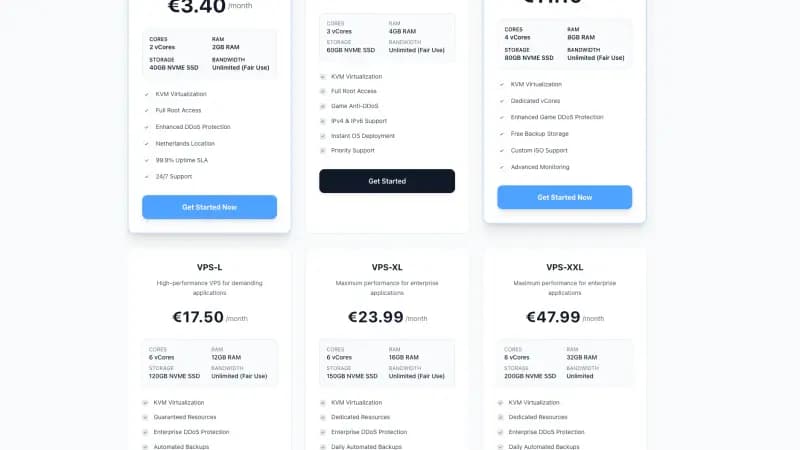
That is more than Starter's 2,500 and fits in Pro's 10,000. For the self-hosted column we use our own Standard VPS-S (3 vCores, 4 GB RAM, 60 GB NVMe) and, if it runs short, the VPS-M (4 vCores, 8 GB, 80 GB), both in an EU data center. As of 30 October 2026 they cost €4.99 and €8.99 a month, or €53.89 and €97.09 for a year, VAT included (VPS for n8n and AI agents).
| 12 months | n8n Cloud Pro 10k | Community edition on a VPS-S |
|---|---|---|
| Paid monthly | €720 (12 × €60) | €59.88 (12 × €4.99) |
| Paid for the year | €600 | €53.89 |
| Executions | Capped at 10,000 a month, 20 at a time | No cap from n8n, and no limit on parallel runs by default (concurrency) |
| Memory | 640 MiB | 4 GB for n8n, its database and the system |
| Longest run | 40 minutes | No timeout by default (EXECUTIONS_TIMEOUT is -1) |
| Backups | Automatic, workflows only | Yours; not in our plan price, but you can arrange them through a support ticket |
Paid yearly on both sides, self-hosting saves €546.11; paid monthly, €660.12. That is your time budget. With twelve monthly sessions for the update, a backup check and system updates, self-hosting stays cheaper while each session costs you less than €45.51, and the one-time setup, SMTP and storage come out of the same budget.
If volume grows. With the inbox check every 5 minutes, the month comes to 10,540 runs, over Pro 10k's cap, so you move to Pro 50k: €1,740 for the year paid monthly, or €1,450 up front. The VPS bill stays the same while CPU and memory keep up. Even with the VPS-M at €97.09 a year, the gap is at least €1,352.91.
If volume stays small. Under 2,500 runs a month, Starter costs €240 for a year against €53.89: €186.11 apart, or €15.51 a month. If a monthly maintenance session costs you more than that in time, Starter is the cheaper choice.
If a team edits the same workflows. The Community edition can't share workflows or credentials, so a self-hosted team needs Business: €8,000 a year, or €3,996 on the startup plan, before the server. Cloud Starter and Pro include credential sharing and shared projects, so here Cloud costs far less.
Which One Fits
- Cloud Starter when you stay under 2,500 runs a month, every run finishes within 5 minutes, and nobody wants to look after a server.
- Cloud Pro when several people build workflows together, or you want n8n to handle updates and backups at up to 50,000 runs a month. Keep polling schedules slow: they use the cap fastest.
- Self-hosted Community edition when you build for your own business, executions keep growing, runs take longer than 40 minutes, or you need custom nodes or bash scripts, which the pricing page lists as self-hosted only. Someone has to update n8n every month and test a restore.
- Self-hosted Business when you need SSO, environments with Git or shared projects on your own server.
- An Enterprise licence when your customers will build their own workflows inside your product; for that setup, n8n's licence FAQ says to contact its sales team.
FAQ
Is self-hosted n8n free for commercial use? For your own business, yes: the licence allows use "for your own internal business purposes", and you may charge clients for building workflows. Letting outside users build or edit workflows, or offering n8n as a hosted service, needs a commercial agreement with n8n.
What happens when I reach my n8n Cloud execution limit? Starter and Pro are capped: n8n charges no overage, and its terms say a capped plan allows no excess usage, so you move to the next plan. The Overview page of the Cloud console shows your execution usage. On the self-hosted Business plan, workflows keep running and overage fees may apply.
Can I move from n8n Cloud to a VPS later? Yes. Download your workflows from the Export page of the Cloud console. Cloud backups hold workflows only, never credentials, so you add credentials again on the new instance. For Cloud instances on PostgreSQL, the export goes through a support ticket.
Is n8n Cloud hosted in the EU? Yes. n8n's pricing FAQ says hosted plans store data "within the EU, on servers located in Frankfurt, Germany". Self-hosted, your data is wherever you run n8n, and the same FAQ notes that n8n collects telemetry by default, which you can switch off.
Sources
All opened on 30 October 2026:
- n8n: pricing (plans, monthly and yearly prices, limits, comparison table and FAQ), startup plan, self-serve terms (last updated 26 October 2026), help centre: VAT number on invoices, Sustainable Use License
- n8n docs, licence and editions: Community license, License FAQ, Choose how to use n8n, Compare editions, Key concept glossary
- n8n docs, Cloud: Try free then choose a plan, Understand concurrency, Manage your data, Update your version, Use the Cloud console, Download workflows, Gateway credits
- n8n docs, self-hosted: Update n8n, Control concurrency, Executions variables, User management, Fix memory issues, Track usage with Insights
- Let's Encrypt: About
- Docker: docker container stats
- procps free(1): Ubuntu 24.04, Debian 12
- Space-Node: VPS for n8n and AI agents (plans and prices including VAT)