
Quick answer: yes, you can self-host small and medium open-weight language models with Ollama on a Space-Node VPS, using CPU-only inference. It works well for personal use, privacy-focused chat, simple automation, and light coding help. It is not a replacement for GPU-accelerated inference, it will not run image generation tools like Stable Diffusion or ComfyUI at usable speed, and it is not a fit for production-scale or high-concurrency AI serving. None of Space-Node's VPS plans include a GPU, so this guide only covers what is honestly achievable without one.
One thing to check first: Standard VPS is out of stock at the moment, while Premium VPS (Ryzen 9 9950X) can be ordered from €4.20 a month. The VPS page always shows the current status.
Who this guide is for
This is for people who searched something like self-hosted AI VPS, run Ollama on a VPS, local LLM hosting, or AI without a GPU, and want a straight answer before buying a plan. If you are looking for GPU-backed AI training or fast image generation, a VPS from any provider without a GPU option is the wrong product, and we would rather tell you that now than sell you a plan that disappoints you.
Why self-host a language model at all
Running your own model instead of calling an API means:
- Your prompts and data never leave your own server.
- No per-token API bills and no rate limits from a third party.
- The model keeps working even if a provider changes pricing or shuts down access.
- Full control over which model version you run and when it updates.
This is a different use case from the API-based approach covered in our AI Discord bot hosting guide, which calls Groq or OpenAI over the network. That approach gets you frontier-model quality with none of the local hardware limits. Self-hosting with Ollama trades some of that capability for privacy and cost control.
The hardware reality: CPU-only, no GPU
Space-Node's VPS plans run on AMD Ryzen 9 hardware: a Ryzen 9 3900X with DDR4 RAM on Standard plans and a Ryzen 9 9950X with DDR5 RAM on Premium. The RAM in your plan is dedicated to your VPS and the vCores are shared with the other VPSes on the node. These are capable desktop-class chips, and our own EPYC vs Ryzen breakdown explains why they suit single-thread-heavy work like game servers and web apps. But that same article is honest about the tradeoff that matters most for language models: Ryzen platforms run two memory channels, while AMD's EPYC 9004 and 9005 series run twelve. CPU-based LLM inference is bound by memory bandwidth more than raw core count, so a Ryzen VPS will generate tokens noticeably slower than a GPU, and generally slower than a high-channel-count server CPU too. Between our two tiers, Premium's DDR5 has more bandwidth on paper than Standard's DDR4.
None of Space-Node's VPS plans currently include a GPU. If your goal is fast token generation, real-time image generation, or model fine-tuning, that requires GPU acceleration that this product does not offer, the same honest limit we already state in our cloud gaming VPS guide about GPU-dependent workloads.
What actually works on CPU-only hardware
Quantized, open-weight models in the 3B to 13B parameter range run acceptably on CPU with Ollama, using formats like Q4_K_M that trade a small amount of accuracy for a much smaller memory footprint. Expect noticeably slower token generation than any GPU or cloud API, single-digit to low double-digit tokens per second depending on model size and how busy the box is, not the near-instant streaming you get from ChatGPT or Claude. That is a real, usable pace for chat, summarizing, drafting, and simple automation. It is not a fit for anything latency-sensitive or high-concurrency.
Sizing by Space-Node plan
Model weights, KV cache overhead, and your OS all compete for the same RAM. These are practical planning guidelines, not guaranteed benchmark numbers, since actual speed depends on the exact model, quantization, and context length you run.
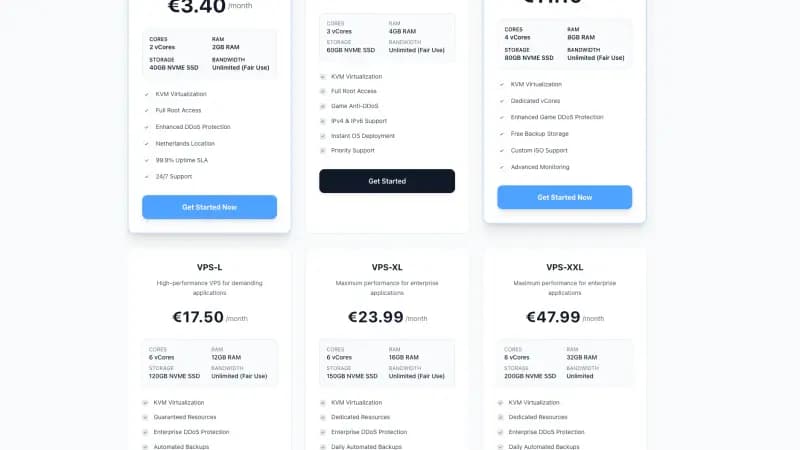
| Plan | RAM / vCores | Realistic model range | Notes |
|---|---|---|---|
| VPS-S (€5.50/mo) | 4 GB / 2 vCores | Small 1B to 3B Q4 models only | Fine for testing, limited for real use |
| VPS-M (€11.10/mo) | 8 GB / 3 vCores | 7B Q4 models | Usable chat and light RAG workloads |
| VPS-L (€17.50/mo) | 12 GB / 4 vCores | 7B to 8B Q4 models with headroom | More comfortable context lengths |
| VPS-XL (€23.99/mo) | 16 GB / 6 vCores | 8B to 13B Q4 models | Best balance of price and capability on this lineup |
| VPS-XXL (€47.99/mo) | 32 GB / 8 vCores | 13B Q4 models, or smaller models with a lot of context | Most headroom, still CPU-only |
Prices in the table are for the Standard tier. Premium (Ryzen 9 9950X) is priced separately, and the VPS page lists both.
If a model's listed RAM requirement is close to your plan's total RAM, size up. Leave real headroom for the OS, Docker, and any other services sharing the box.
What not to attempt on this hardware
Be direct about the limits before you build around them:
- Image generation (Stable Diffusion, ComfyUI, Flux, and similar): these need a GPU to be usable. CPU-only generation is technically possible but slow enough to not be worth attempting on this product.
- Fine-tuning or training: training workloads are far more compute-intensive than inference and are not realistic on CPU-only VPS hardware.
- High-concurrency serving: a single CPU-only VPS handling many simultaneous chat sessions will queue and slow down fast. This setup is for personal or small-team use, not a multi-tenant AI product.
- Frontier-model quality: open-weight 7B to 13B models are useful but are not equivalent to GPT-4-class or Claude-class models. Set expectations accordingly.
A basic Ollama setup
curl -fsSL https://ollama.com/install.sh | sh

# pull a quantized model sized for your plan
# (an 8B model needs VPS-M or larger; on VPS-S try llama3.2:3b)
ollama pull llama3.1:8b

# run it
ollama run llama3.1:8b
For anything beyond quick testing, run Ollama behind a reverse proxy with authentication rather than exposing its API port directly, the same approach covered in our Docker vs bare metal and n8n self-hosted guides. If you already run n8n on a VPS, pointing an HTTP Request node at a local Ollama endpoint is a common way to add private text generation to workflows without sending data to a third-party API.
Realistic use cases
- A private chat assistant for personal use, with no data going to a third party.
- Summarizing or classifying text inside an automation pipeline (n8n, scripts, cron jobs).
- A coding helper for solo development work.
- Small retrieval-augmented generation (RAG) setups over your own documents.
- Testing and comparing open-weight models before deciding whether a larger, GPU-backed setup is worth paying for elsewhere.
FAQ
Can I run Stable Diffusion or ComfyUI on a Space-Node VPS? Not at a usable speed. These tools are built around GPU acceleration, and none of our VPS plans include a GPU. CPU-only image generation is technically possible but too slow to be practical.
Which Space-Node plan should I start with for Ollama? VPS-M (8 GB RAM) is a reasonable starting point for 7B quantized models. If you want more headroom for larger models or longer context windows, VPS-XL (16 GB RAM) is the better balance of price and capability on this lineup.
Will a VPS ever match GPU inference speed? No. CPU inference on any provider's VPS, ours included, will be slower than GPU inference. The value here is privacy, cost control, and full ownership of the setup, not raw speed.
Can I fine-tune a model on this hardware? No. Fine-tuning needs far more compute than inference. This setup covers running pre-trained, quantized models, not training or fine-tuning them.
See VPS plans for current pricing and specs, or read our full Netherlands VPS guide for the broader picture on hardware and network.