
Quick answer: A streaming bot dashboard can be a genuinely easy way to get a 24/7 channel running, and the reviews for tools in this category are often solid, Streaming Bots for example carries a strong Trustpilot rating with recent reviews praising ease of setup. The trade-off is that the actual streaming stack stays hidden behind the dashboard. This guide is for the specific case where you like the simplicity but want to be able to see and fix what is actually running underneath it.
What a bot dashboard is actually doing
Underneath the simple interface, a streaming bot is running something close to what OBS does manually: encoding a video source, connecting to an RTMP or SRT ingest endpoint, and keeping that connection alive continuously. The dashboard exists to hide that complexity from you. That is a real feature for someone who wants zero technical involvement, and it is a real limitation the moment something goes wrong and the only information you have is whatever the dashboard chooses to show you.
Recreating a bot workflow in OBS
- Write down your current settings first. Resolution, bitrate, target platforms and any overlays or branding the bot is currently running. You cannot rebuild what you have not documented.
- Order the matching Space-Node plan. OBS Studio comes pre installed, so there is no separate setup step for the software itself.
- Recreate each bot feature as an OBS source. A looping video becomes a Media Source or a VLC playlist for rotation. A sponsor banner or logo becomes an Image Source. Any chat or now playing overlay becomes a Browser Source.
- Enable OBS auto-reconnect and run an unlisted test. Confirm bitrate, resolution and stability match or beat what the bot was doing before you touch your production stream key.
- Keep the bot service running for one extra day as a safety net. Cancel it only after your OBS stream has proven stable, there is no reason to burn the bridge before you are confident the replacement works.
Choosing the right plan for what you were running on the bot
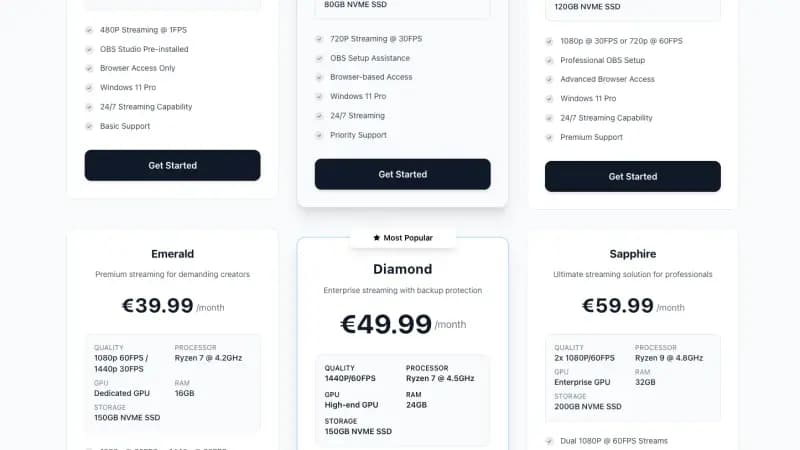
- Music or radio loop with no video complexity: Gold covers a 720p loop or lightweight visual with an audio playlist comfortably.
- 1080p video with overlays: Platinum is the common default here, it includes a dedicated GPU and enough headroom for chat overlays and branding on top of the base stream.
- Multi-platform output to YouTube, Twitch and Kick together: Diamond gives more room for the extra encoding load of running several destinations or heavier browser sources at once.
The actual value of visibility
The honest case for this migration is not that bot dashboards are unreliable, plenty of people run them without issue. It is that when a stream key gets rejected, a source goes missing, or dropped frames start climbing, a dashboard can only tell you what it was built to tell you. OBS shows you the real thing: CPU and GPU load, dropped frame counts, audio meters, and exactly which source in the scene is failing. That difference matters most in the moment something actually breaks, which is also the worst possible time to be waiting on a third party's status page.
Keeping it simple for the rest of your team
If other people help manage the channel day to day, you do not need to hand them the full complexity of OBS. Lock the scene collection, document the handful of actions they actually need, starting and stopping the stream, swapping a playlist folder, changing a sponsor image, and keep the deeper settings for whoever owns the technical side. This keeps the day to day experience close to as simple as a bot dashboard while still giving you full visibility when something needs a real fix.
Getting started
See the full side by side comparison on our Streaming Bots alternative page, or go directly to streaming VPS plans to match your current setup to a plan. Support can help configure your first scene collection, stream key and browser access if you want help getting the migration right the first time.