
Quick answer: OBS Studio 32.2.0 released on July 21, 2026. The headline change is a redesigned Add Source dialog, along with a fix for NVENC choosing the wrong bitrate in CQVBR mode and several crash fixes. If your channel runs 24/7 on a streaming VPS, this is a safe update to install, but do it during a quiet window and export your scene collection first.
What actually shipped in OBS 32.2
OBS Studio 32.2.0 replaces the old dropdown for adding sources with a new Add Source dialog that shows rich previews of existing and recently added sources before you add them to a scene. For anyone running a lot of Media Sources, Browser Sources and VLC playlists in a 24/7 rotation, this makes it noticeably faster to find and reuse a source instead of hunting through a flat list.
The other changes worth knowing about:
- A new filter for composing SDR footage into HDR scenes.
- Copy and paste added to the frontend API, useful for anyone scripting scene changes.
- A delete hotkey to remove sources on macOS.
- Dynamic bitrate support added to multitrack video.
- Missing file support for filters, so a broken filter reference no longer silently breaks a scene.
- Plugins can now set custom icons for new source types.
On the bug fix side, OBS 32.2 corrects NVENC selecting an incorrect bitrate when operating in CQVBR mode. It also fixes black output from Display Capture after certain duplicator failures, virtual camera reset failures, source toolbar buttons becoming unresponsive after a source is dragged into a group, and a handful of crashes tied to shutdown, settings changes, and video device reconnection.
Why the NVENC fix matters if you stream on a GPU plan
The CQVBR bitrate bug is the one change actually worth pausing on for a 24/7 channel. CQVBR (constrained quality variable bitrate) is a common encoder mode when you want NVENC to hold quality steady without blowing past your upload ceiling, which is exactly the mode most people reach for on an always-on stream. If OBS was quietly picking a bitrate different from what you configured, that shows up as unexplained buffering warnings or a stream that looks softer than it should on platforms like YouTube or Twitch, without an obvious cause in your settings.
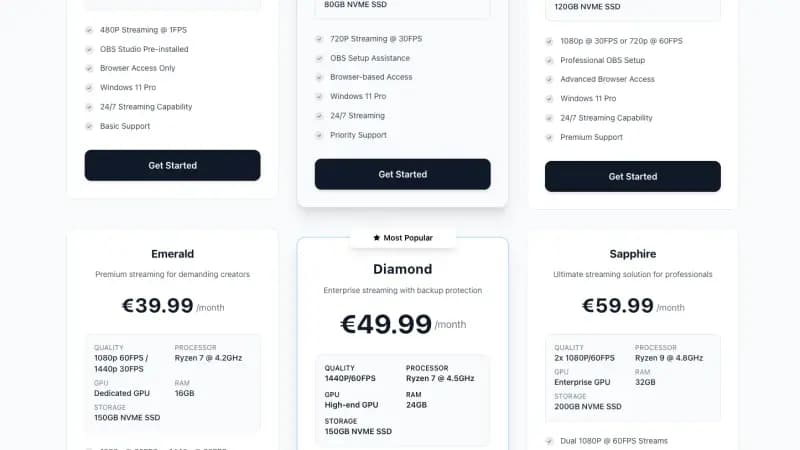
This matters most on plans using dedicated or high-end GPU encoding, meaning Platinum and above on Space-Node's streaming lineup, since those are the tiers actually leaning on NVENC for 1080p60, 1440p, or dual-stream output. If you have been fighting a bitrate that never quite matched what you set in OBS, this update is worth installing before you spend more time chasing encoder settings that were never the problem.
How to update safely on a 24/7 streaming VPS
Updating OBS on a server that is currently live is different from updating it on a home PC you can restart without an audience. A few steps that keep the update boring instead of a whole incident:
- Export your scene collection first. OBS keeps scene collections as simple files, and exporting one takes a few seconds. Space-Node streaming VPS plans do not include automatic backups, so this is the one file you want a copy of before touching anything.
- Pick a quiet window. If your channel has a predictable low-viewer hour, the update takes a couple of minutes and a brief restart of OBS, so plan it there rather than during a peak.
- Update inside the browser panel. Access your Space-Node streaming VPS through the browser based interface, no RDP required, download the new OBS installer, and run it like you would on a desktop.
- Test on an unlisted stream first. Before pushing the update to your live channel, start a short unlisted stream and check dropped frames, bitrate stability and audio sync for a few minutes.
- Watch the first hour after switching back to your real stream key. This is where a CQVBR bitrate mismatch would have shown up before, so it is also where you will notice the fix working.
Does every 24/7 streamer need to update right away
No. If your channel is stable, your bitrate looks correct in the platform's health dashboard, and you are not fighting crashes, there is no urgency. The Add Source dialog is a workflow improvement, not something that fixes a broken stream. The bug fixes are the real reason to move, and they matter most if you have seen any of the specific symptoms above: NVENC bitrate that does not match your setting, Display Capture going black after a monitor or GPU driver hiccup, or crashes tied to changing settings mid stream.
If none of that describes your setup, there is no harm in waiting a week or two and letting other people find any edge cases first, then updating during your own quiet window.
Related reading
For general encoder tuning beyond this specific update, see our OBS encoder settings for 1080p60 guide and OBS auto reconnect setup for keeping a 24/7 channel stable through network blips. If you are choosing hardware for the first time, our streaming VPS plans start at €9.99/month with OBS Studio pre installed, and GPU accelerated tiers begin at Platinum for anyone running NVENC on 1080p60 or higher.