A 24/7 YouTube live stream can be created in two main ways:
- Use a SaaS cloud streamer like Upstream, Gyre, Live247 or playout.video.
- Run OBS on a cloud streaming server like Space-Node.
Both approaches work. They just serve different creators.
Quick Comparison
| Tool | Best for | Main tradeoff |
|---|---|---|
| Upstream.so | Polished browser studio for pre-recorded loops | Less server-level control |
| Gyre.pro | Pre-recorded stream promotion and multi-stream packages | Higher public pricing for many users |
| Live247.io | Usage-based YouTube playlist streaming | Narrower YouTube-first workflow |
| playout.video | Cloud playout, 20+ destinations and 4K positioning | Still a SaaS dashboard, not your own OBS server |
| Space-Node | Full OBS Studio in the cloud | You need to use OBS or ask support to configure it |
Upstream.so
Upstream is one of the strongest SaaS options in this market. Public pages emphasize Stream Designer, separate audio/video playlists, multistreaming to 10 destinations, YouTube Verified Software Encoder status, ad cuepoints and browser-based control.
Choose it if you want no server access and a polished product.
Compare: Upstream.so Alternative
Gyre.pro
Gyre focuses on 24/7 live streams of pre-recorded videos. Public pricing starts higher than many basic tools, but Gyre also positions around growth, traffic and multi-stream use cases.
Choose it if you want a well-known pre-recorded stream tool and do not need full OBS.
Compare: Gyre.pro Alternative
Live247.io
Live247 is attractive because of usage-based pricing and a simple YouTube-focused workflow. Their public page emphasizes upload, activate and go live, with pricing around hourly stream use.
Choose it if you like pay-by-use simplicity and your workflow is mostly YouTube playlists.
Compare: Live247.io Alternative
playout.video
playout.video is strong for browser-based playout. Public pages emphasize 4K UHD, 60fps, 20+ platforms, inline playlist switching, overlay editing, scheduling and automatic recovery.
Choose it if you want cloud playout and broad platform support without managing OBS.
Compare: playout.video Alternative
Space-Node OBS Streaming Server
Space-Node is the different option. Instead of hiding the streaming machine, we give you access to it.
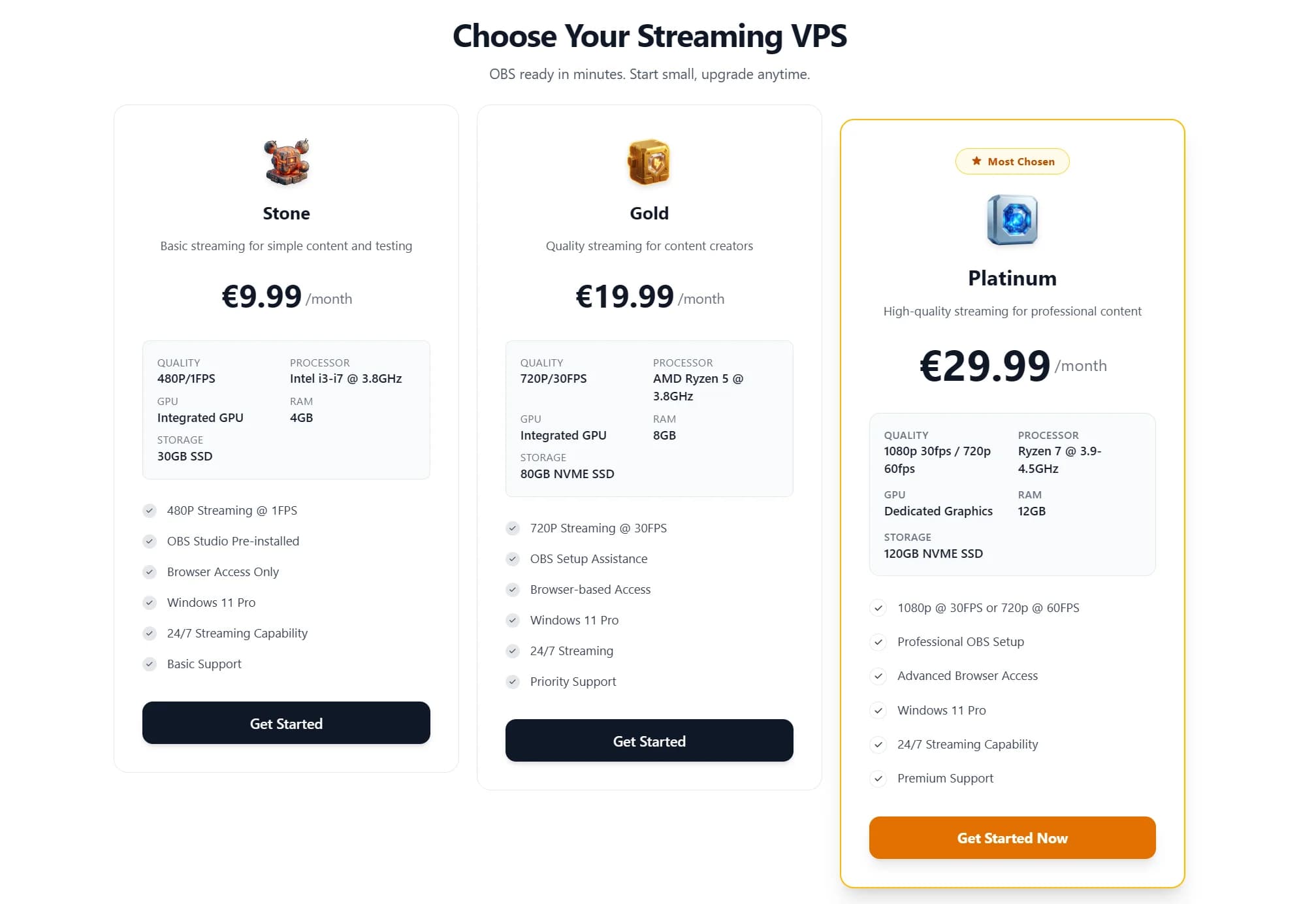
You get a Windows streaming server with OBS Studio installed, browser access, RDP access, 1 Gbps Netherlands uplink and GPU encoding on higher plans. That makes it better for creators who want:
- OBS scenes and plugins
- Live content, not only uploaded videos
- Browser sources and StreamElements overlays
- Multi-platform RTMP through OBS
- NVENC encoder control
- Troubleshooting access
- A migration path from home PC to cloud
Start here: Streaming VPS with OBS
What Should You Choose?
Pick a SaaS tool if your team needs the simplest possible upload-and-loop experience.
Pick Space-Node if your channel is becoming a real streaming operation and you want the control room in the cloud.
A useful rule:
- One finished MP4 forever: SaaS tool
- Changing playlists and overlays: SaaS or OBS
- Live + pre-recorded hybrid: OBS server
- Game capture, browser capture, NDI or custom plugins: OBS server
- You want to troubleshoot everything yourself: OBS server
FAQ
What is the cheapest 24/7 YouTube live stream setup?
A lightweight OBS server can be cheaper than many SaaS tools if you can configure OBS yourself. Space-Node starts at €9.99/mo, with Gold at €19.99/mo for simple 720p workflows.
What is the easiest 24/7 YouTube live stream tool?
For pure beginners, a browser SaaS tool is usually easiest. For creators who already know OBS, a Space-Node streaming server is often easier long-term because the interface is familiar.
Can I stream to Twitch and Kick too?
Yes. OBS supports RTMP destinations directly and can use obs-multi-rtmp for multiple simultaneous destinations.
Is 24/7 streaming good for YouTube growth?
It can help with watch time and discoverability if your content is useful, rights-safe and not repetitive spam. It does not bypass YouTube quality or monetization rules.
Legal Notice
Legal Notice & Disclaimer: This article constitutes an independent, factual comparative review and critical analysis for educational purposes only. Space-Node is not affiliated with, endorsed by, or sponsored by any hosting provider mentioned herein. All brand names, logos, and trademarks referenced are the registered intellectual property of their respective owners and are used solely for identification and factual reference.
Fair Use & Review Rights: This review is protected commentary, comparison, and criticism. It is based on publicly available information, official pages where available, published documentation, and general hosting engineering analysis. Where hands-on testing is not explicitly stated in the article, no private benchmark or internal infrastructure access is implied. This constitutes lawful comparative review and criticism protected under fair use doctrine.
Factual Accuracy: Specific plan claims are based on public information available at the time of writing. Specifications, pricing, and service features can change, so readers should verify current details on the provider's official website before purchasing. We make no false or defamatory statements; criticism is limited to documented facts, clearly labeled opinion, or general hosting guidance.
No Consumer Confusion: This article makes clear that Space-Node offers distinct, independently-developed hosting infrastructure. We explicitly differentiate our services, pricing, and technical specifications. No reader could reasonably be confused about service provider identity.
Right to Comparative Advertising: Space-Node reserves the right to publish factual comparative information about competing services. This is a recognized right in consumer protection law and advertising standards. Accurate comparative reviews cannot constitute trademark violation, defamation, or unfair competition.
Limitation of Liability: Space-Node makes no warranty regarding third-party services reviewed. Readers are responsible for verifying information independently before purchasing. Space-Node disclaims liability for third-party service changes, outages, or policy modifications.
Space-Node Services: For Space-Node's own managed hosting solutions, visit Minecraft hosting or VPS hosting.