
Lofi and radio channels are still the most common 24/7 format, and we have covered that setup in depth elsewhere. Three other formats have grown alongside them in 2026: wildlife and nature cams, retro TV style rewind channels with scheduled blocks, and AI assisted music visualizer streams. Each needs a different technical approach, so here is what actually matters for each one.
Nature and wildlife cams
Channels built around a fixed camera feed of wildlife, forests or coastlines, in the style of large nature cam networks and the many independent 24/7 wildlife streamers on YouTube, have kept a steady audience because the format does not depend on trends. What people are actually watching for is a live, continuous feed, not a produced video.
The technical setup is different from a typical OBS loop. Instead of looping a media file, the source is usually an IP camera with RTSP or RTMP output, often PoE powered for a permanent outdoor install. That feed needs to reach your streaming server, either as a direct RTMP push from the camera if it supports one, or pulled into OBS as a media or capture source and re-encoded for your output platform.
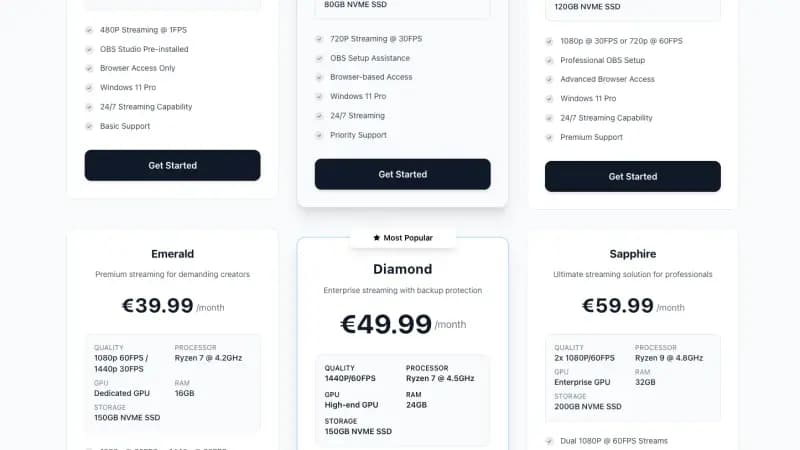
Hosting angle: a single camera relay with no overlays and no heavy encoding is one of the lighter workloads on a streaming VPS, but wildlife footage needs continuous full motion, not a low frame rate feed, so this is not the place for the most basic tier. A 720p30 plan is a reasonable starting point for a single camera relay, moving up if you plan to run multiple camera angles, add a picture in picture overlay, or push to 1080p. Keep the encoder settings conservative and prioritize a stable bitrate over resolution, since viewers of this format tolerate lower detail far better than dropped frames or buffering.
Retro TV rewind channels
Nostalgia programming has had a real resurgence, from broadcast revivals like Rewind TV in the UK and RetroCast Now's return in 2026, to dedicated 24/7 retro apps on smart TV platforms, to independent YouTube channels running scheduled blocks of old cartoons, sitcoms and variety shows. The format that is actually working is not a single long file, it is a dayparted schedule: morning cartoons, afternoon sitcoms, an evening movie block, an overnight loop.
This is exactly the workflow our Live247.io alternative and playout.video alternative pages already describe. Build one OBS scene per programming block, for example Morning, Afternoon, Prime and Overnight, each pointed at its own VLC Video Source playlist or folder. Use the Advanced Scene Switcher plugin to change scenes automatically by time of day, and keep one fallback scene ready in case a file is missing or a block runs long.
A legal note before you build this: only schedule content you actually have the rights to stream, meaning public domain material, content you own, or content properly licensed for streaming. A retro TV format does not change copyright rules, and this is one of the fastest ways to get a channel claimed or taken down if the source material is not cleared.
Hosting angle: dayparted scheduling with multiple playlists and scene switching benefits from more headroom than a single loop, since OBS is holding several scene collections and switching sources throughout the day. A plan with a dedicated GPU, meaning Platinum or above on Space-Node's lineup, gives you room for lower thirds, sponsor overlays and smoother 1080p output across all the blocks without re-rendering video every time you change a schedule.
AI generated music visualizer streams
Audio reactive, AI assisted visualizers have grown fast in 2026 as browser based tools have gotten good enough to generate real time, rhythm synced visuals from a track instead of a static looping background. For 24/7 music channels, lofi, synthwave, ambient and instrumental categories in particular, this is replacing the single looping wallpaper video that defined the format a few years ago.
The practical setup is an OBS Browser Source. Most of these visualizer tools run in a browser and output audio reactive graphics you can crop and layer like any other source, the same technique already used for chat overlays and now playing widgets. Route your music playlist as the audio source, add the visualizer as a browser source layered underneath your overlays, and you have a channel that looks meaningfully different from a single MP4 on loop.
Hosting angle: real time browser rendered visuals are more demanding than a static video loop, since OBS is running a live browser source continuously rather than decoding one file. This is where a dedicated GPU plan earns its keep, both for the visualizer rendering and for the encoder doing the actual stream output at the same time. As with any music channel, keep proof of rights for whatever you are playing, our royalty free music for 24/7 lofi streams guide covers how to document that.
Picking hardware across all three formats
None of these formats need the top tier plan by default, but none of them are as light as a single static loop either. A useful way to think about it: a single camera relay or a simple visualizer channel is comparable to a standard 720p lofi setup, while a dayparted retro TV schedule with multiple overlays and scene changes behaves more like a professional 1080p channel with regular manual changes. Start with a plan that matches your resolution target, and remember every Space-Node streaming plan can be upgraded later with prorated billing if a format grows past what you first expected.
See the full lineup on our streaming VPS plans page, or read how a real OBS scene setup compares to closed video loopers on our Gyre.pro alternative page if your format is going to need more than one playlist.