People ask us whether they should pick Space-Node or "24/7 hosting" for a Minecraft, FiveM or streaming server. This page sticks to things you can check yourself.
What "24/7 hosting" usually means
Plenty of hosts call themselves 24/7 hosting, free ones included. Usually it means the server keeps running when nobody is online, unlike free hosts that stop an empty server and make you start it again. The label says nothing about the CPU, the support hours or the real monthly price.
Almost every paid game host, Space-Node included, keeps a paid server running around the clock. So compare the exact plan you would buy, not the name on the box.
What Space-Node offers
Checked against our own plan pages on 28 September 2026:
- Minecraft: Standard plans from €2.70 a month (MC Coal, 3 GB) and Premium plans from €5.25 a month (3 GB). The CPU is shared on Standard and Premium; Premium plans in the Netherlands, Germany, Poland and Canada get 600 to 800% CPU (6 to 8 vCores) under fair use.
- FiveM: from €3.99 a month for 2 GB.
- Streaming: a Windows 11 Pro streaming VPS with OBS preinstalled, browser access and a 1 Gbps uplink in the Netherlands, from €9.99 a month. The RAM is dedicated to the VPS; the vCores are shared with the other VPSes on the node.
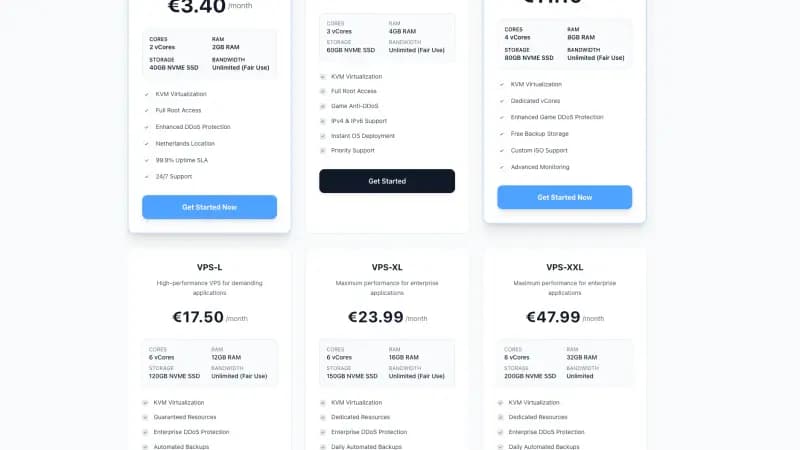
- VPS: KVM VPS in the Netherlands from €5.50 a month (4 GB, 2 vCores), with dedicated RAM and shared vCores. Both VPS tiers are out of stock until about the end of October.
Game servers run on a Pterodactyl panel with SFTP, backups, scheduled tasks and one-click installers for Paper, Forge, Fabric, NeoForge and popular modpacks. The hardware follows the region you pick:
| Region | Minecraft hardware |
|---|---|
| Netherlands, Germany, Poland, Canada (Premium) | AMD Ryzen 9 9950X, DDR5 |
| Netherlands, Germany, Poland, Canada (Standard) | Ryzen 9 3900X-class, DDR4 |
| USA (California, Virginia) | AMD Ryzen 9 7950X3D, DDR5 |
| Singapore, Australia | AMD Ryzen 9 5950X, DDR4 |
| India (Mumbai) | Ryzen 9 3900X-class |
FiveM has no tiers: it runs on the Ryzen 9 9950X in Europe, the 7950X3D in the USA, the 5950X in Singapore and Australia, and 3900X-class hardware in India. DDoS protection is included everywhere, and checkout is billed in EUR.
Support runs through live chat and Discord, every day from roughly 08:00 to 20:00 UTC. The servers keep running outside those hours, but if something breaks at 03:00 UTC a person picks it up in the morning. That is a real downside if your players are awake at night and you are not. There is no money-back window; refunds and cancellations follow our terms.
What we could not verify about "24/7 Hosting"
We could not match the name "24/7 Hosting" to one provider's current plan page, so we do not list its plans or numbers here. If you have a specific host in mind that sells itself as 24/7 hosting, open its current plan page and fill in the checklist below.
Checklist for the comparison
Fill this in for both hosts, for the exact plan you would buy:
| Question | Where to look |
|---|---|
| Which CPU model, in which location? | Plan or hardware page. "High performance CPU" is not an answer. |
| Shared or dedicated CPU? | FAQ or plan features |
| RAM, storage size, and is the storage NVMe? | Plan card |
| Does the server stay on with nobody online? | Plan features, free tier rules |
| Is there a location near your players? | Location list |
| Is DDoS protection included or an add-on? | Plan features |
| When is support staffed, and where? | Contact page |
| What is the price after the first month, in which currency? | Checkout, before you pay |
| What do the terms say about refunds? | Terms of service |
| Can you get your files out easily (SFTP, backups)? | Panel features |
Then run your own server on it for a few days before you move a community over. Your modpack, your plugin list and your player count tell you more than any comparison page, this one included.
Moving a Minecraft server to Space-Node
The steps are short:
- Stop the old server and download the world folder, plus the plugins or mods folder, from the old host.
- On Space-Node, pick the same server software and version in the panel.
- Upload the files with SFTP (FileZilla works) or the web file manager. SFTP is easier for worlds over 1 GB.
- Check server.properties, start the server and join it yourself before you share the new address.
If you would rather not do it yourself, Minecraft plans have a One-time Server Migration add-on (€15) at checkout: we move the server from your old host to Space-Node for you.
So which one?
If you want a person on support at 3 in the morning, pick a host that staffs support around the clock; we don't. If you want to know which CPU you run on in which region, and you like a Pterodactyl panel with SFTP access, compare our plans against the checklist above:
Legal Notice
Legal Notice & Disclaimer: This article constitutes an independent, factual comparative review and critical analysis for educational purposes only. Space-Node is not affiliated with, endorsed by, or sponsored by any hosting provider mentioned herein. All brand names, logos, and trademarks referenced are the registered intellectual property of their respective owners and are used solely for identification and factual reference.
Fair Use & Review Rights: This review is protected commentary, comparison, and criticism. It is based on publicly available information, official pages where available, published documentation, and general hosting engineering analysis. Where hands-on testing is not explicitly stated in the article, no private benchmark or internal infrastructure access is implied. This constitutes lawful comparative review and criticism protected under fair use doctrine.
Factual Accuracy: Specific plan claims are based on public information available at the time of writing. Specifications, pricing, and service features can change, so readers should verify current details on the provider's official website before purchasing. We make no false or defamatory statements; criticism is limited to documented facts, clearly labeled opinion, or general hosting guidance.
No Consumer Confusion: This article makes clear that Space-Node offers distinct, independently-developed hosting infrastructure. We explicitly differentiate our services, pricing, and technical specifications. No reader could reasonably be confused about service provider identity.
Right to Comparative Advertising: Space-Node reserves the right to publish factual comparative information about competing services. This is a recognized right in consumer protection law and advertising standards. Accurate comparative reviews cannot constitute trademark violation, defamation, or unfair competition.
Limitation of Liability: Space-Node makes no warranty regarding third-party services reviewed. Readers are responsible for verifying information independently before purchasing. Space-Node disclaims liability for third-party service changes, outages, or policy modifications.
Space-Node Services: For Space-Node's own managed hosting solutions, visit Minecraft hosting or VPS hosting.