Version-specific mechanics to avoid bad advice
- Poke Snacks are not generic food. They are placed to attract Pokemon, stack to 16, and can be bitten 9 times before they disappear.
- Poke Snacks are made with a Campfire Pot, and seasoning can change what kinds of Pokemon are attracted.
- Campfire Pot is a utility block placed on a campfire. It has three seasoning slots and supports food plus early brewing recipes.
- Fossil and resurrection mechanics are version-sensitive. Check the official Fossils and Resurrection Machine pages before writing exact recipe or drop claims.
- Friendship can be checked with
/friendship <slot>when cheats/permissions are enabled. - Economy servers should price berries, fossils, snacks, Link Cable, evolution stones and held items from live drop rates, not copied wiki assumptions.
Verified Cobblemon facts used for this guide
This page has been checked against the official Cobblemon wiki as of May 5, 2026. The current official wiki banner highlights Cobblemon 1.7.0, "Set Course!".
| Fact | Why it matters |
|---|---|
| Cobblemon 1.7.0 added riding, Campfire Pot, Poke Snacks and Pokemon cosmetics | Guides about controls, servers and mechanics need to mention these version-specific features |
| Rideable Pokemon do not need a saddle | Players ride through the interaction menu, and ride stats are separate from battle stats |
| Riding styles include land, liquid and air categories | Server owners should expect faster exploration and more chunk loading |
| Poke Snacks are placed items that attract Pokemon and can be bitten 9 times | Public servers should test snack farms and spawn hubs before opening them |
| Campfire Pot uses seasoning slots and supports food plus early brewing recipes | Berries, snacks and economy pages should not treat recipes as generic vanilla crafting |
| Cobblemon commands require cheats or server permissions | Command guides should warn before showing /clearparty, /clearpc or restart commands |
Exact species spawns, drops, forms and addon behavior can change by Cobblemon version, datapack and server config. Use the official wiki for species data and then verify the live server config before publishing spawn rates or economy prices.
Quick answer: Cobblemon mechanics like breeding, fossils, berries, drops, friendship, and pasture block behavior are version-sensitive. Use the official wiki for exact recipes, then check your server config before building farms or economies.
Breeding table, berry chart, and pasture block searches
The long-tail searches around this page are very specific. Players want a Cobblemon breeding guide, a breeding items list, a Pokemon breeder table, berry breeding recipes, fossil steps, and answers for how long the process takes.
| Search intent | Practical answer |
|---|---|
| Cobblemon breeding guide | First confirm your Cobblemon version and whether your server changed breeding rules. |
| Cobblemon breeding items / breeding drops | Treat items and drops as server economy data. Public servers often rebalance them. |
| Pokemon breeder table Cobblemon | Use a table only if it matches your installed version and addon set. |
| Cobblemon berry breeding chart | Berry mutation or crossbreeding details can change by version, datapack, or addon. Verify before farming at scale. |
| How to breed berries in Cobblemon | Start with the official berry mechanics for your version, then test growth, drops, and farm limits on your server. |
| Pasture block Cobblemon breeding | Pasture behavior is server-sensitive. Check capacity, chunk loading, and permissions. |
| Cobblemon fossils guide | Fossil finding and resurrection should be checked against the current Fossils and Resurrection Machine pages. |
| How long does breeding take Cobblemon | Server configs can change timing, so publish your own timing if you run a public server. |
| Occa, Sitrus, Starf, friendship berries | These are item-specific searches. Link players to your own economy or wiki page if rates are custom. |
For command permissions around /friendship and staff tools, see the Cobblemon commands and controls guide.
Why this topic deserves its own page
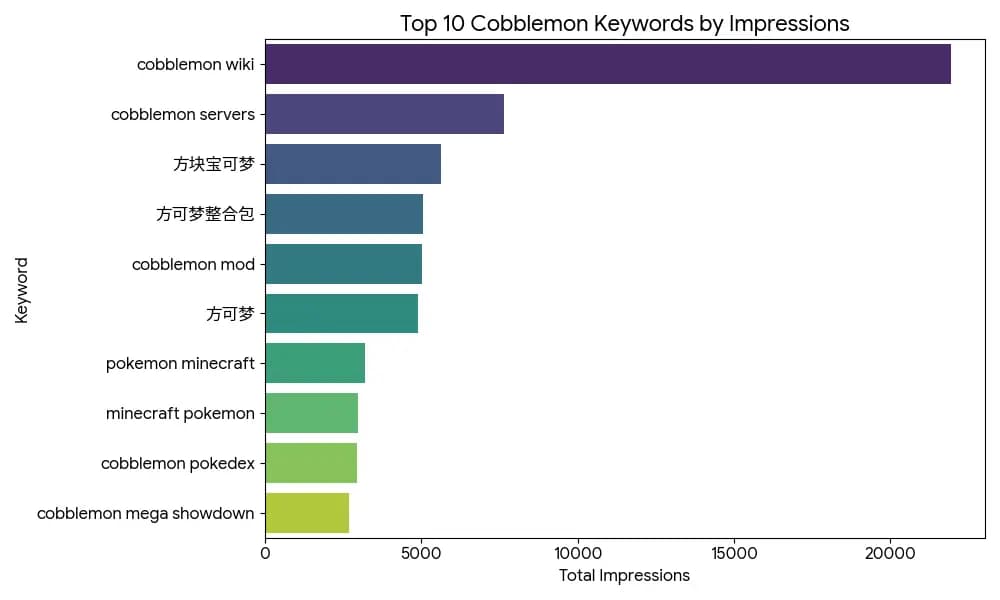
The CSV has separate demand for cobblemon breeding, cobblemon breeding guide, cobblemon fossils, fossil cobblemon, cobblemon fossil machine, cobblemon berries, berry cobblemon, drops cobblemon, cobblemon drops, cobblemon friendship, pasture block cobblemon, and pokesnack cobblemon.
Those are mechanics searches, not server-hosting searches. They need quick answers and warnings about version differences.
Mechanics table
| Topic | What to check |
|---|---|
| Breeding | Version, pasture behavior, server rules |
| Fossils | Fossil item source, fossil machine, restoration steps |
| Berries | Growth, farming, held-item effects, economy value |
| Drops | Species drops, loot table changes, addon changes |
| Friendship | Evolution requirements, server modifiers |
| Poke Snacks | Campfire Pot recipes and attraction behavior |
Server owner advice
If you run a public Cobblemon server, these mechanics become economy systems. Do not leave everything default without testing.
Recommended rules:
- Limit automated farms if they break berry value.
- Publish fossil rules before players find rare fossils.
- Explain whether drop rates are vanilla Cobblemon or custom.
- Back up before changing datapacks.
- Keep a changelog for breeding and item changes.